The old screen was organized, but it still felt like a form.
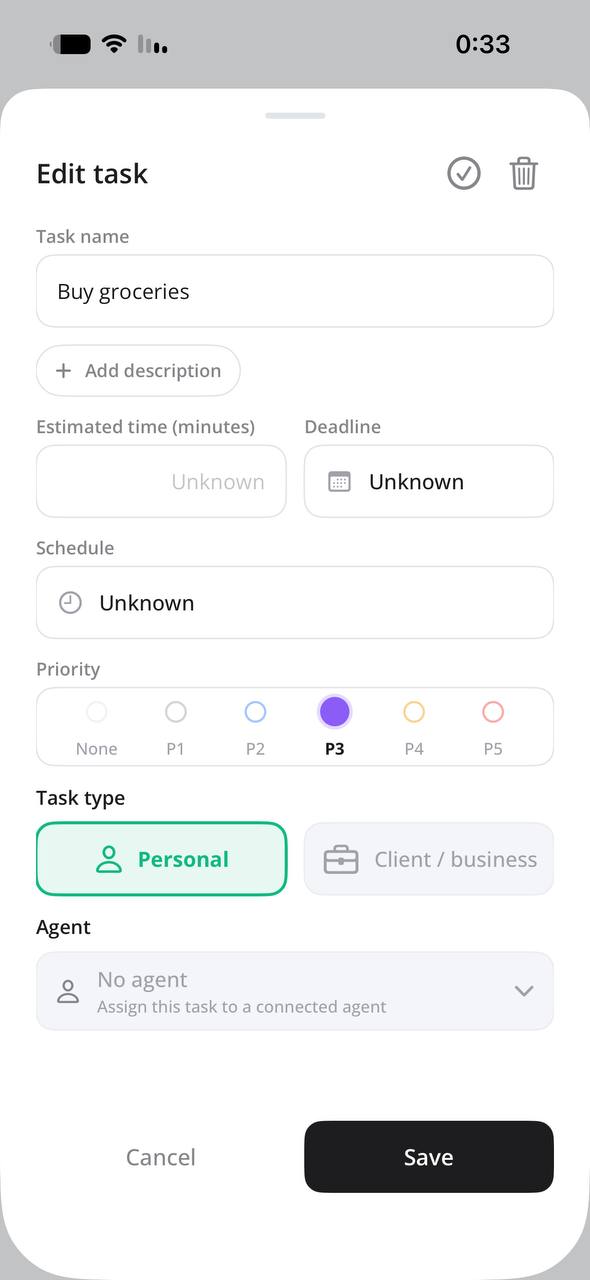
The previous task settings screen did a lot of things correctly. It had explicit labels, a task name field, estimated time, deadline, schedule, priority, task type, agent assignment, cancel, and save.
That is useful.
But it also made the task feel like a form to complete.
For a productivity app, that matters. A user does not open task settings because they want to admire settings. They open it because they want the task to become clearer, faster, or more actionable.
The new screen feels more like a control surface.
The redesigned version moves away from “fill out every field” energy.
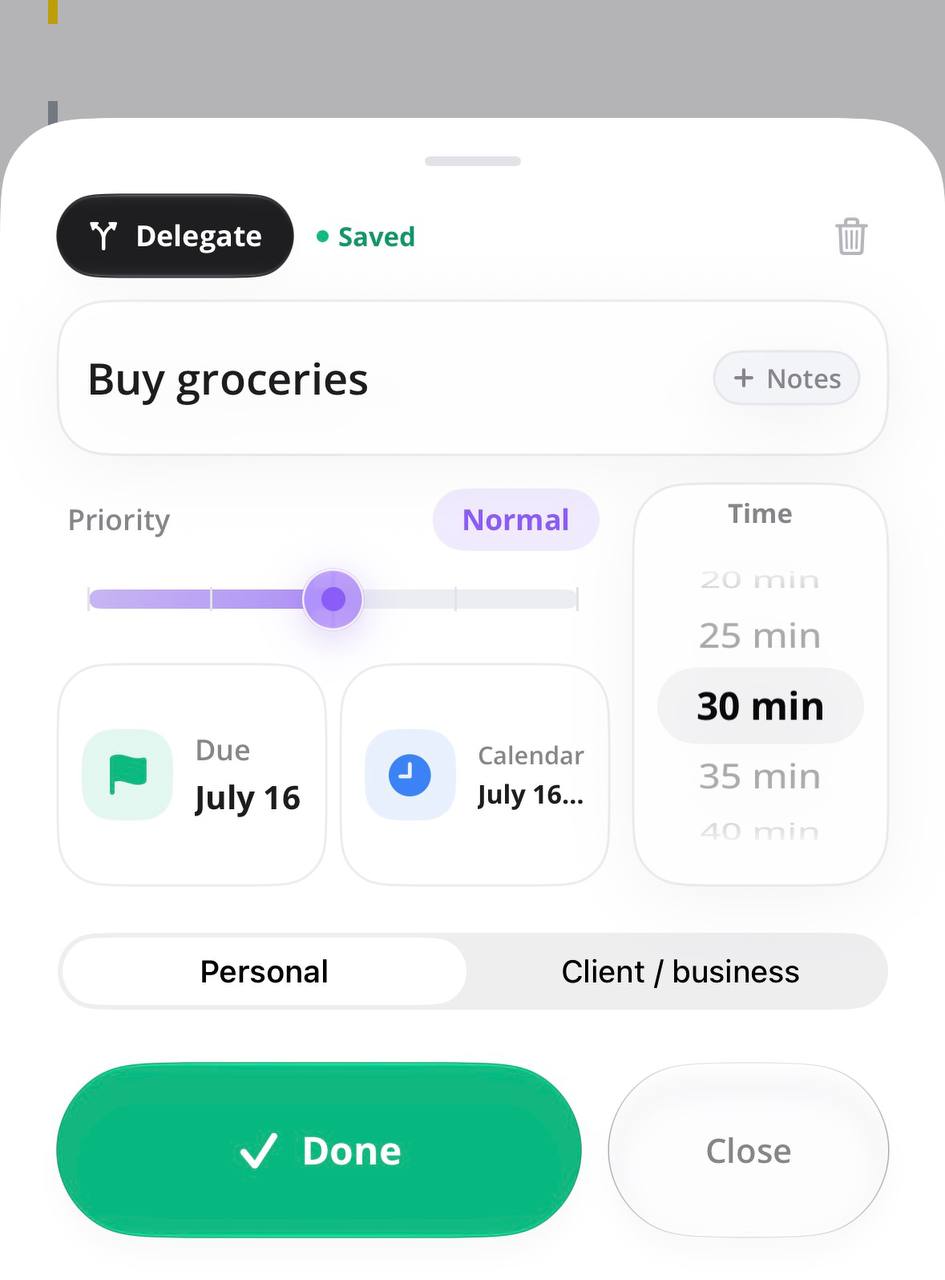
It starts with the outcome: this task can be delegated, it is saved, and the user can quickly adjust the parts that matter.
The task name gets a large calm field. Notes become an add-on instead of a permanent empty text area. Priority becomes a visual slider. Due date and calendar are cards. Time becomes a focused picker. Personal versus client/business becomes a clear segmented choice. Done is a confident final action.
That is the improvement: the screen feels less like configuration and more like shaping the task.
Minimalism is not making every control tiny.
This is the important part.
Minimalism does not always mean smaller, flatter, or fewer visible controls. Sometimes the minimal version is the one that makes the decision easier.
The new design is visually richer than a plain form, but cognitively lighter. The user can see the task, understand the state, adjust the main variables, and leave.
Minimalism is not the absence of UI. It is the absence of unnecessary hesitation.
The task should feel ready to move.
Nala is not being built as a passive task database. The direction is to help move work forward.
That is why the new screen matters. “Delegate” is not just a button. It hints at the larger product idea: tasks should be able to move from capture into action.
The settings screen has to support that without becoming intimidating. It needs enough structure for real work, but enough calm that a simple task still feels simple.
The product lesson
The better a task manager gets, the easier it is to accidentally make it feel heavy. This redesign pushes the other way.
- Make the primary task visible first.
- Show state clearly: saved, delegated, done.
- Use bigger controls when they reduce thinking.
- Group related decisions into cards.
- Make completion feel obvious.
That is the kind of minimalism that matters for Nala: not less capability, but less friction between the user and the next useful action.
Quick answers
What changed in the task settings redesign?
The newer design moves from a dense labeled form toward a clearer control surface: Delegate and Saved state at the top, a larger task field, visual priority, due/calendar cards, a time picker, a stronger task type selector, and a large Done action.
Why is this more minimal if it has bigger controls?
Because minimalism is about reducing cognitive load, not making everything small. Bigger controls can be more minimal when they make the next decision obvious.
How does this connect to Nala as an AI task manager?
Nala needs task settings that can support real action — including delegation — while still making everyday task capture feel calm and fast.